Word Search Sea: Offline Games
- 4.9
- Rating
- 10.00M
- Installs
- Free
- Price
 Analysis by App-foxy
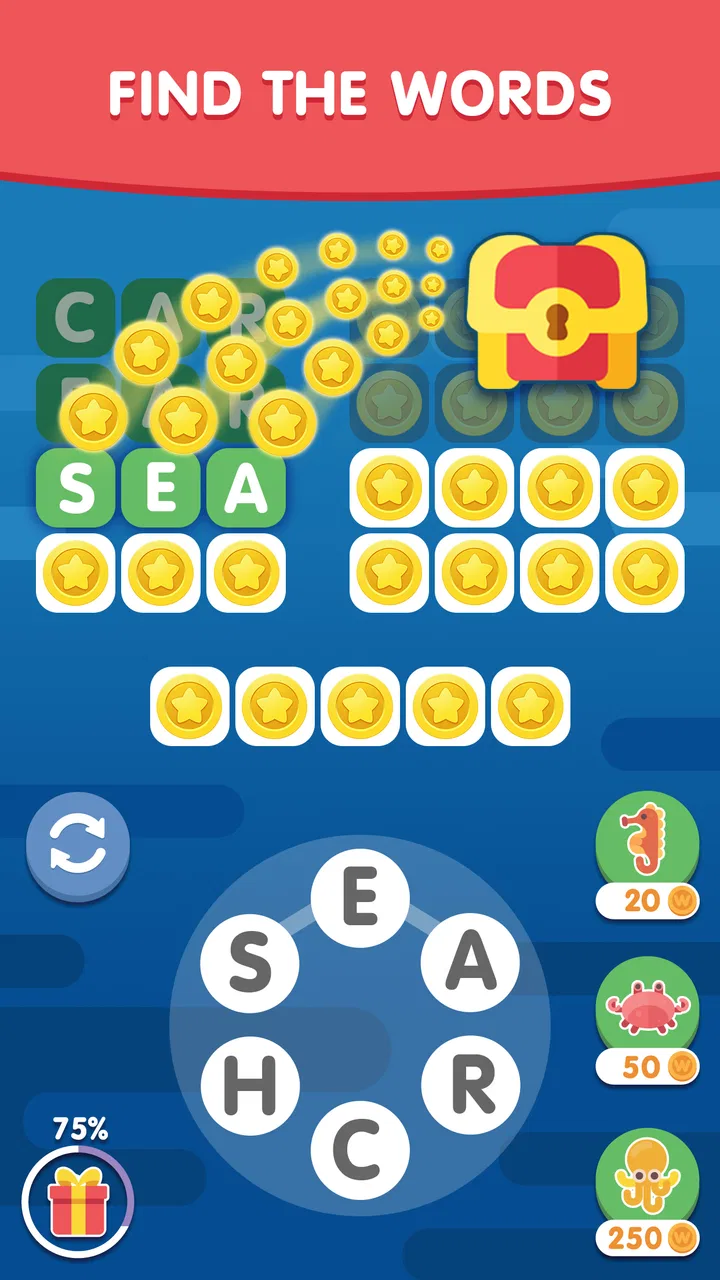
I opened Word Search Sea: Finding Words expecting a simple way to pass a few quiet minutes, and that is exactly where it makes the most sense. This is a free word game from Malpa Games, built around finding hidden words rather than racing, fighting, or managing a complicated collection of systems. The presentation aims for a calm mood, while the basic challenge still gives your attention something definite to do.
That combination makes it easy to recommend to someone who enjoys word searches but wants a more relaxed mobile format. I found it especially suitable for short breaks, evening downtime, or those moments when I wanted to focus on one small task without committing to a long session. It is available for Everyone, runs on Android 8.0 or later, and has reached over ten million installs. Its average rating is 4.9 from around 550 thousand ratings, which suggests that its straightforward approach has connected with a large audience.
What to expect when you begin
The central activity is familiar: you examine a grid of letters and trace words hidden inside it. The appeal is not in learning a complicated rule set. It comes from the small satisfaction of spotting a word, following its letters correctly, and clearing another part of the puzzle. If you have played printed word searches, the first few moments should feel natural, although the touch controls change how carefully you need to move.
You May Also Like

 Blood Strike: 2.5 Anniversary
Blood Strike’s Loadouts Turn Every Drop Into a Tactical Gamble
A close look at Blood Strike’s custom loadouts: how fast access to signature weapons reshapes its battle royale rhythm, rewards preparation, and narrows the gap between fights.

 Pandora - Music & Podcasts
Pandora’s Music Is Easy to Start, but Harder to Recover
Pandora’s strength is its low-effort path from a seed to a station. Its weak spot is how much confidence it asks you to place in connection, setup, and quiet recovery.

 8 Ball Pool
 Is Built on Rivalries, Rematches, and Routine
A close look at the rivalries, rematches, shared routines, and unanswered safety questions that turn a quick pool match into a persistent mobile community.

 Samsung Music
’s Quiet Strength Is Playing What You Already Own
Its reach comes less from spectacle than from dependable access to a personal library. That simplicity is both the app’s strongest retention engine and its ceiling.

 AccuWeather: Weather Radar
AccuWeather Review: A Quick, Clear Forecast for Everyday Decisions
For everyday plans, the best forecast is the one you can understand quickly. AccuWeather makes rain timing, radar, and local conditions easy to act on, with a few trade-offs.

 Hill Climb Racing
Why Hill Climb Racing Still Turns Crashes Into One More Run
A tiny car, a bumpy hill and one more upgrade: Hill Climb Racing keeps resurfacing because its simple chaos makes every near-miss feel personal.
More From Our News Desk



I would describe the game as a gentle concentration exercise rather than a demanding vocabulary test. The calm theme helps keep the experience from feeling like an exam, but the puzzles still require you to scan deliberately. At first, I was tempted to drag quickly across any promising sequence. A better approach is to slow down, check the direction of the word, and make sure the selected letters form the complete answer before lifting your finger.
The game is a good match for players who like visible progress and clear tasks. Each successful find provides an immediate sense of completion, which works well when you only have a few minutes. It is less suitable if you want a story, character development, competitive multiplayer, or a deep strategic layer. The word-search format stays at the center, and that focus is both its main strength and its main limitation.
Because it is free to download, trying it does not require a purchase up front. The app does include optional in-app purchases, with individual items ranging from $0.99 to $47.99. I would approach those carefully and decide first whether the basic loop is enough for your habits. For many casual players, the free starting experience is the important test: if finding words feels satisfying without extra spending, there is little reason to rush into purchases.
Why the calm format works
Many word games push players toward speed, streaks, or increasingly complicated combinations. This one is easier to settle into because the immediate goal remains readable. I can open it while waiting for an appointment, complete a small amount of progress, and close it without feeling that I have abandoned a larger task. That makes it more practical than a game that only feels rewarding after a long session.
There is also a useful middle ground between passive relaxation and active mental work. Watching a video may help me switch off, but it does not ask me to engage with anything. A word search gives me a modest challenge without demanding the intensity of a timed puzzle. For readers who want to exercise attention in a low-pressure way, that balance is the reason to try it.
Getting through the first setup
Starting is uncomplicated. Install the game on a compatible Android device, open it, and move into the first available puzzle. The current version is 5.05.02, and the minimum operating-system requirement is Android 8.0. That matters if you are using an older phone or tablet: checking the system version before installing can save you from an unnecessary download attempt.
I recommend beginning with the sound and visual environment that feels least distracting to you. A word-search game depends on sustained scanning, so anything that makes the board harder to read can become irritating quickly. Use a comfortable screen brightness, hold the device in the position that gives your finger room to move, and avoid starting your first puzzle while rushing between tasks.
The first useful adjustment is not a hidden setting or a complicated strategy. It is simply changing your expectations about pace. The game may look easy when you first see a grid, but the eye needs time to search across rows, columns, and diagonals. If you treat the opening puzzle as a race, you may swipe over letters too quickly and create mistakes. If you treat it as a visual scan, the controls feel much more forgiving.
Another practical tip is to keep your finger movement steady. Start at the first letter, follow the word’s direction, and finish on the final letter rather than making a loose gesture across the board. This sounds obvious, but it is the difference between a clean selection and an uncertain one. On a small phone, I found it easier to use the pad of my finger lightly and keep my wrist relaxed instead of pressing hard.
Making the first successful find
For a first-time player, the best opening goal is not to clear the entire puzzle immediately. It is to locate one word without guessing. Begin by checking the most noticeable letter patterns: repeated vowels, unusual consonants, or a short sequence that looks likely to appear in the target list. Once you see a plausible starting point, inspect every direction around it rather than dragging at random.
When I find a candidate, I mentally confirm the spelling before touching the screen. Then I trace from the first letter to the last in one controlled motion. This two-step habit is valuable because it separates searching from selecting. Searching is visual; selecting is physical. Mixing them together leads to accidental swipes and makes the board feel more confusing than it really is.
After the first word is marked, use the remaining list as a guide instead of scanning the entire grid with no plan. Look for distinctive letters in the next answer, then check whether those letters can form a straight line in any direction. This is more efficient than reading every row from left to right. It also turns the puzzle into a series of small investigations, which is where I think the game is most enjoyable.
A realistic example is a short break during a workday. I might open the game while waiting for a meeting to begin, find one or two words, and stop when the meeting is ready. I do not need to remember a story or rebuild a complicated strategy when I return later. The session can be brief and still feel complete. That flexibility is one of the strongest reasons I would suggest it to someone who wants a casual game rather than a second job.
Common points of confusion
The biggest early mistake is assuming that every word will be placed in the same direction. A careful player should check horizontal, vertical, and diagonal lines, and should also remember that a word may run in the opposite direction from the way it is normally read. If you only search from left to right or top to bottom, you are ignoring much of the board.
It is also easy to confuse a promising fragment with the actual answer. Seeing several correct letters in a row does not always mean the selection is complete. I found it more reliable to compare the candidate with the word list before swiping. This prevents the common cycle of trying random lines, getting no useful result, and losing track of which parts of the grid have already been examined.
Another source of frustration is using hints too early. When a puzzle stalls, a hint can seem like the obvious solution, but I prefer to give myself one structured search first. Choose one unsolved word, identify its rarest letter, and inspect every straight line passing through that letter. This method often reveals the answer while preserving the satisfaction of finding it myself. Hints are more valuable when I have genuinely exhausted that process.
Players should also know what the game is not trying to be. It is not a replacement for a full vocabulary-learning course, because finding a word does not automatically teach its definition or usage. It is not the best choice for someone who needs a competitive ranking system or a strong social component either. If your ideal word game is a fast anagram challenge, a crossword with clues, or a multiplayer contest, this slower search format may feel too narrow.
Turning simple searches into a better routine
Once the first puzzles feel comfortable, I suggest adopting a repeatable scanning routine. I start with the longest-looking answers because they are easier to distinguish once I locate their first few letters. Then I check unusual letters and diagonals, followed by shorter words that may be hidden among lines I have already inspected. This order reduces aimless movement and helps me remember where I have looked.
One non-obvious benefit of this approach is that it makes the game more accessible during tired moments. When my attention is low, I do not have to invent a new strategy for every board. I can follow the same sequence: long words, unusual letters, reverse directions, then short words. The routine lowers the mental overhead while leaving enough challenge to keep the session meaningful.
I also recommend taking a short pause instead of staring at the same area indefinitely. Word searches can produce a form of visual tunnel vision: after looking at one cluster for too long, the letters seem to blend together. Putting the phone down for a minute and returning with fresh eyes can reveal a word that was visible all along. This is a better response to difficulty than repeatedly dragging across the same suspected line.
For families, the Everyone rating makes the game approachable across a broad age range. I can imagine an adult and child sharing a device and taking turns locating words, with the older player explaining how to search diagonally or backward. That said, the experience is still most rewarding when each player can comfortably read the grid and use touch controls. It is a quiet shared activity, not a party game designed for several people at once.
The game also works as a small screen-break alternative, although it should not be confused with rest for the eyes. I would use it when I want to replace passive scrolling with a more focused activity, not when I need to stop looking at a screen entirely. That distinction matters for anyone planning to use it during a long day of computer work.
How it compares with other word-game choices
Compared with crosswords, this game removes the need to interpret clues or recall detailed general knowledge. That makes the entry point gentler and the feedback faster. Crosswords are better when I want language, trivia, and deduction to interact. Word Search Sea is better when I want a clearly defined visual task and do not want to spend several minutes deciphering a clue.
Compared with anagram games, the emphasis is different. Anagrams ask me to rearrange letters and discover possibilities; this game asks me to recognize a word hidden in a fixed arrangement. Anagram games can feel more creative and mentally active, while this format is calmer and more predictable. I choose between them based on my mood: anagrams when I want to generate answers, word searches when I want to scan and confirm.
Compared with timed word challenges, the sea-themed presentation and relaxed pacing make this a less stressful option. The trade-off is that players who enjoy pressure may find it lacking in urgency. There is no reason to expect the same adrenaline as a countdown-based puzzle. Its value lies in concentration without a harsh penalty for taking a moment to look carefully.
That comparison also clarifies who should skip it. If you need definitions, spelling lessons, competitive events, or a narrative campaign, choose a different type of word app. If you already know that repeating a familiar search pattern becomes boring for you, the basic format may not hold your attention for long. I would not install it expecting a broad collection of unrelated mini-games; the attraction is the focused word-search experience.
Who will enjoy it and what to do next
I think the strongest audience is anyone who wants a free, approachable word game for short sessions. It suits beginners because the rules are easy to understand, and it suits experienced puzzle players who enjoy improving their scanning habits. It can also work for people who want a calmer alternative to games built around constant rewards, rapid reactions, or competitive pressure.
The most useful next step after installation is simple: finish the opening puzzle without using a hint, then decide how the experience feels rather than judging it by the theme alone. Pay attention to whether the board is comfortable to read, whether tracing words feels accurate on your device, and whether the level of challenge keeps you interested. Those details matter more than the large rating displayed on the store page because they determine whether the game fits your own hands and habits.
If you enjoy the first session, keep the scanning routine and use short, deliberate play periods. Do not force yourself to complete every available word in one sitting. The game is at its best when it remains a small, repeatable break. If you become frustrated, try checking reverse and diagonal directions before assuming that the puzzle is unfair. Most early difficulty comes from search habits, not from needing a complicated technique.
Malpa Games has kept the product focused on a familiar activity, and that focus explains both its accessibility and its boundaries. The free entry point makes experimentation easy, while the optional purchases mean I would still keep an eye on spending if children use the device. The current release, 5.05.02, is the version I would look for when installing, and Android users should make sure their device meets the 8.0 requirement.
My final view is positive, with a clear condition: choose it for calm word searching, not for a feature-heavy puzzle adventure. I like that a first success can happen quickly, yet the boards still reward patience, direction checking, and a more disciplined scan. For a quiet few minutes of focused play, this is a reassuring first word game rather than an overwhelming one. If that is what you want, Word Search Sea: Finding Words is worth trying for free; if you need variety, competition, or deeper language instruction, another word-game style will serve you better.
FAQs for Word Search Sea: Offline Games
01What is Word Search Sea: Finding Words?
Word Search Sea: Finding Words is a puzzle game available for both Android and iOS platforms. It challenges players to find hidden words within a grid of letters. The game features various levels of difficulty, themes, and categories, making it suitable for a wide range of ages and skill levels.
02Are there any in-app purchases available in Word Search Sea?
Yes, Word Search Sea offers in-app purchases. These purchases can include additional themes, hints, and ad-free experiences. While the game is free to download, these optional purchases enhance gameplay by providing more content and convenience, especially for those who enjoy an uninterrupted gaming experience.
03Can I play Word Search Sea offline?
Yes, Word Search Sea can be played offline. This feature makes it convenient for users who want to enjoy the game without an internet connection. Whether you're on a flight or in an area with limited connectivity, you can still indulge in solving puzzles at your own pace.
04How does Word Search Sea help improve cognitive skills?
Word Search Sea enhances cognitive skills by promoting critical thinking and concentration. The game challenges players to quickly identify patterns and words within a jumble of letters, which can improve vocabulary, memory, and problem-solving abilities. It's an engaging way to keep your mind sharp.
05Is Word Search Sea suitable for children?
Yes, Word Search Sea is suitable for children. The game offers various difficulty levels and themes, making it accessible and enjoyable for younger audiences. With its educational benefits and fun gameplay, it's a great tool for kids to learn new words and develop language skills in an entertaining way.
Pros
- Intuitive interface enhances user experience.
- Variety of puzzles keeps gameplay engaging.
- Offline mode available for on-the-go play.
- Regular updates with new challenging levels.
- Helps improve vocabulary and focus.
Cons
- In-app purchases can be pricey.
- Ads may interrupt gameplay.
- Limited hints can be frustrating.
- Graphics are simple
- lacking flair.
- No multiplayer mode for competitive play.

Word Search Sea: Offline Games
Gallery